> For the complete documentation index, see [llms.txt](https://panduan-sap.simplidots.id/llms.txt). Markdown versions of documentation pages are available by appending `.md` to page URLs; this page is available as [Markdown](https://panduan-sap.simplidots.id/sales-automation-platform/smh-sales-management-hub/penjualan/faktur/cara-membatalkan-sales-invoice.md).
# Cara Membatalkan Sales Invoice
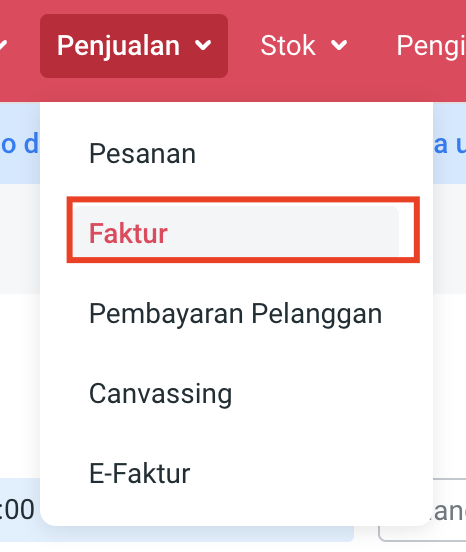
**Step 1.** Buka menu **Penjualan > Faktur.**
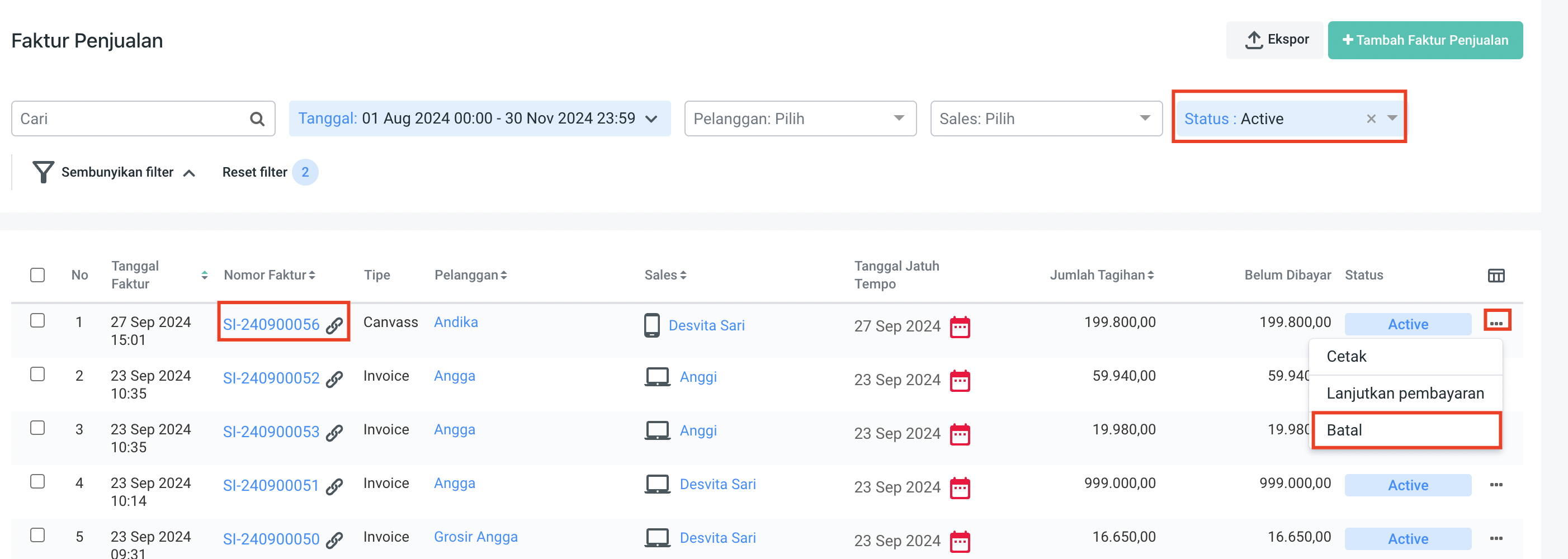
**Step 2.** Pilih nomor **Faktur Penjualan d**engan status **Active** yang akan dibatalkan.
**Step 3**. Pilih tanda action titik tiga kemudian pilih **Batal.**
**Step 6.** Pilih **Ya.**
Faktur berhasil dibatalkan jika muncul pop up notifikasi "**Faktur penjualan (SI-xxxxxxxxxx) berhasil dibatalkan"** dan **Status Faktur** berubah dari **Active** menjadi **Cancelled**.
Silakan dicoba, Kawan Simpli! :)