# Cara Melihat Gambar Kunjungan Canvassing

### Cara Melihat Gambar Kunjungan Canvassing

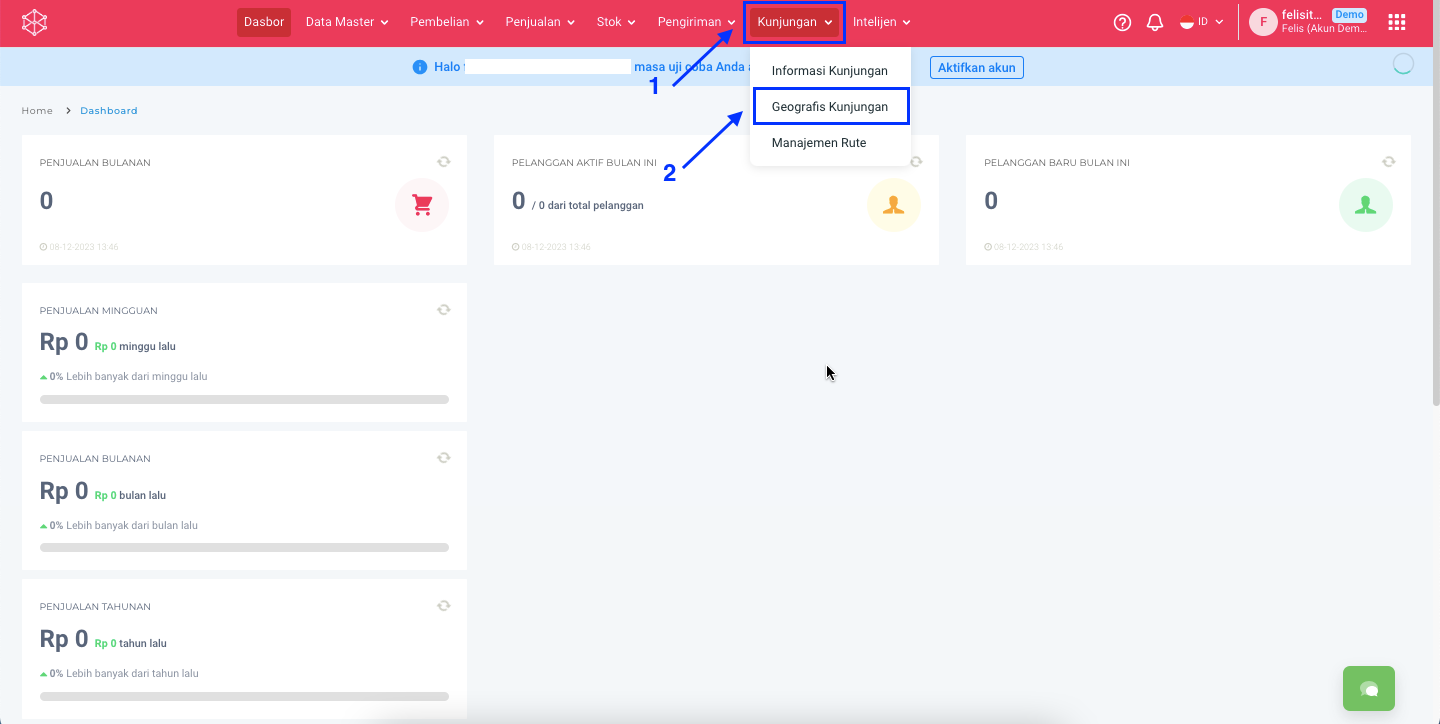
**Step 1:** Masuk ke menu **Kunjungan** > **Geografis Kunjungan.**

<figure><img src="https://3837174706-files.gitbook.io/~/files/v0/b/gitbook-x-prod.appspot.com/o/spaces%2F-ML6LhsHx5TJpV4GOuvJ%2Fuploads%2FyhBtR1lVTnZKr0YXzcPJ%2Fimage.png?alt=media&#x26;token=213896ca-a02d-4d25-9cad-1d4e63a1b946" alt=""><figcaption></figcaption></figure>

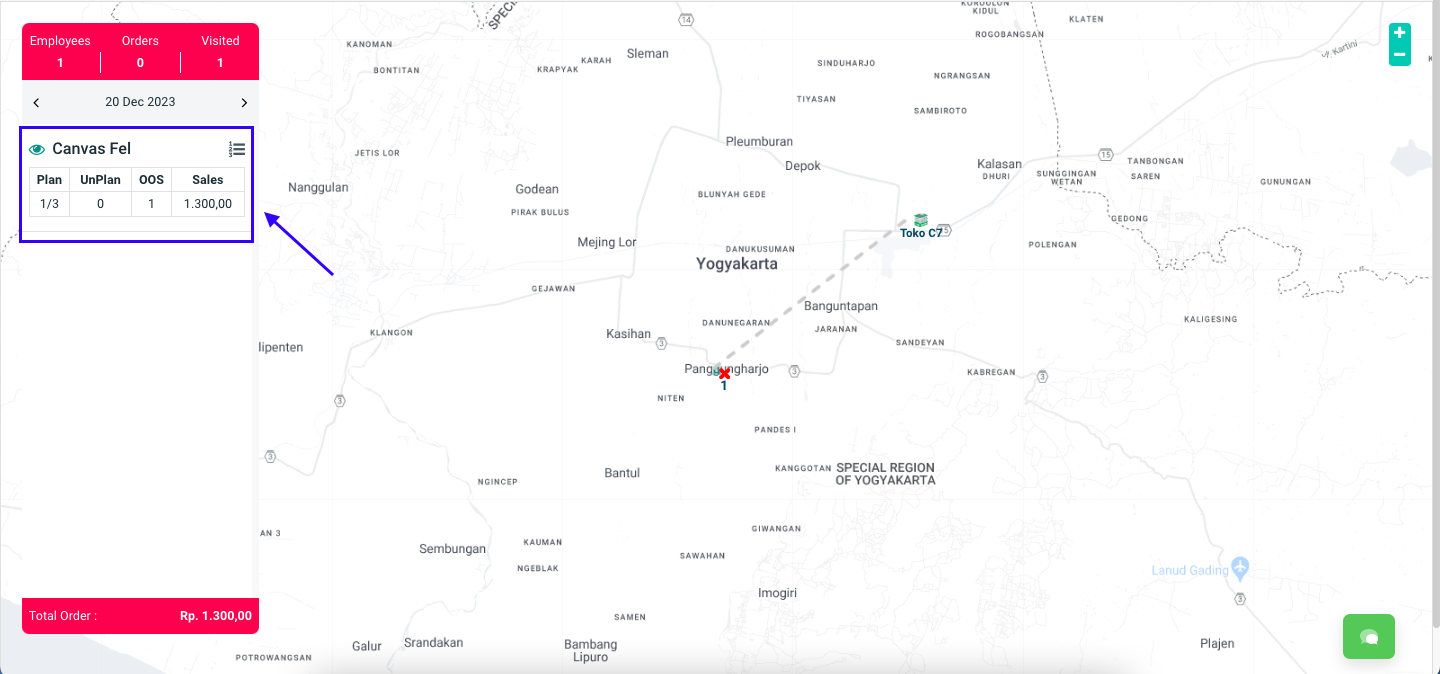
**Step 2:** Pilih nama salesman yang ingin dilihat hasil kunjungannya.

<figure><img src="https://3837174706-files.gitbook.io/~/files/v0/b/gitbook-x-prod.appspot.com/o/spaces%2F-ML6LhsHx5TJpV4GOuvJ%2Fuploads%2FoavehSYD8KyWgYpVJpka%2FScreenshot%202023-12-20%20at%2013.26.28.png?alt=media&#x26;token=5cf38f2a-f3dd-4356-affd-a023eace3e71" alt=""><figcaption></figcaption></figure>

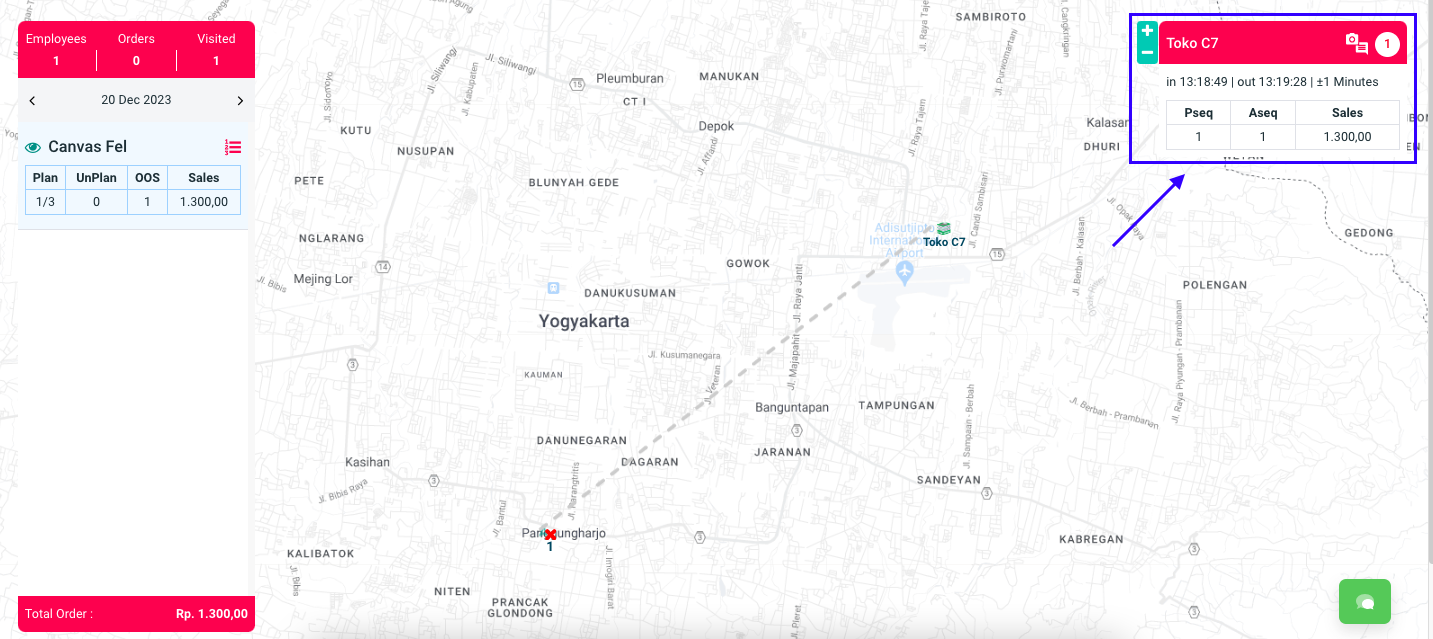
**Step 3:** Akan muncul nama customer yang telah dikunjungi.

<figure><img src="https://3837174706-files.gitbook.io/~/files/v0/b/gitbook-x-prod.appspot.com/o/spaces%2F-ML6LhsHx5TJpV4GOuvJ%2Fuploads%2FUpCpzUGksSg7Ckiqz1w0%2FScreenshot%202023-12-20%20at%2013.27.38.png?alt=media&#x26;token=1122aa99-c918-4b32-833f-97db5dcd3b33" alt=""><figcaption></figcaption></figure>

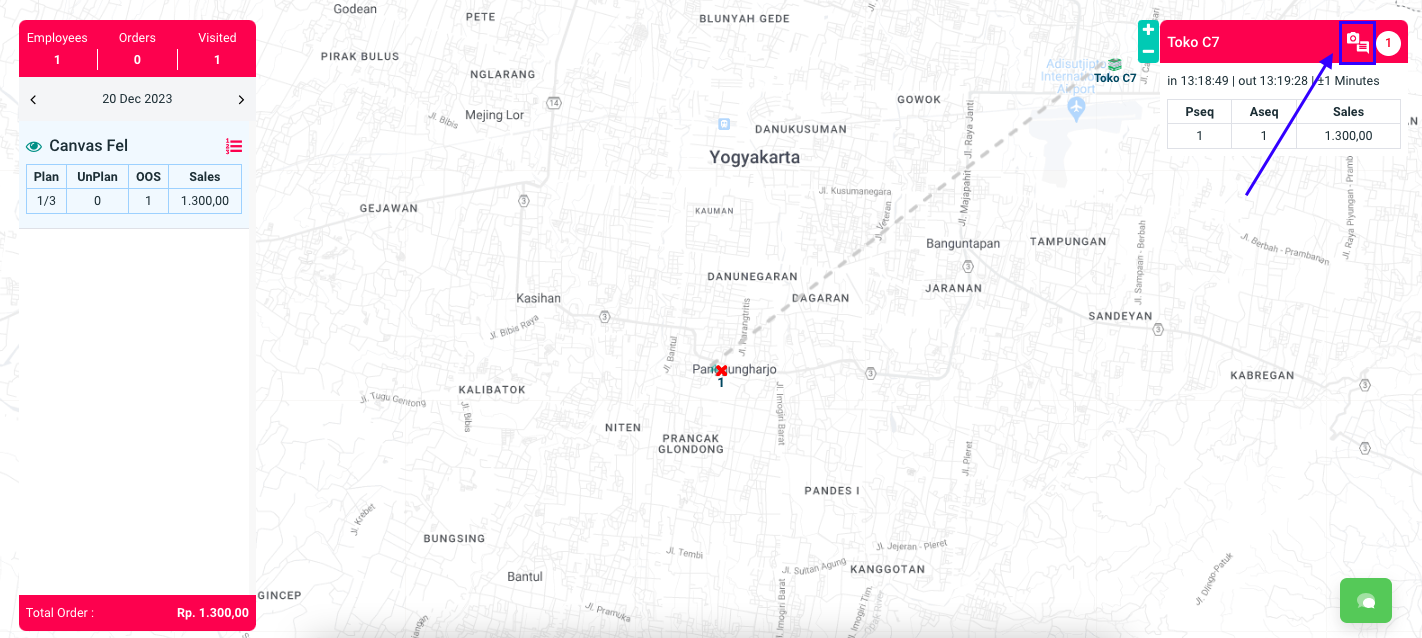
Step 4: Klik icon Kamera & Notes.

### Cara Melihat Gambar Kunjungan Canvassing

**Step 1:** Masuk ke menu **Kunjungan** > **Geografis Kunjungan.**

<figure><img src="https://3837174706-files.gitbook.io/~/files/v0/b/gitbook-x-prod.appspot.com/o/spaces%2F-ML6LhsHx5TJpV4GOuvJ%2Fuploads%2FyhBtR1lVTnZKr0YXzcPJ%2Fimage.png?alt=media&#x26;token=213896ca-a02d-4d25-9cad-1d4e63a1b946" alt=""><figcaption></figcaption></figure>

**Step 2:** Pilih nama salesman yang ingin dilihat hasil kunjungannya.

<figure><img src="https://3837174706-files.gitbook.io/~/files/v0/b/gitbook-x-prod.appspot.com/o/spaces%2F-ML6LhsHx5TJpV4GOuvJ%2Fuploads%2FoavehSYD8KyWgYpVJpka%2FScreenshot%202023-12-20%20at%2013.26.28.png?alt=media&#x26;token=5cf38f2a-f3dd-4356-affd-a023eace3e71" alt=""><figcaption></figcaption></figure>

**Step 3:** Akan muncul nama customer yang telah dikunjungi.

<figure><img src="https://3837174706-files.gitbook.io/~/files/v0/b/gitbook-x-prod.appspot.com/o/spaces%2F-ML6LhsHx5TJpV4GOuvJ%2Fuploads%2FUpCpzUGksSg7Ckiqz1w0%2FScreenshot%202023-12-20%20at%2013.27.38.png?alt=media&#x26;token=1122aa99-c918-4b32-833f-97db5dcd3b33" alt=""><figcaption></figcaption></figure>

**Step 4:** Klik icon <img src="https://3837174706-files.gitbook.io/~/files/v0/b/gitbook-x-prod.appspot.com/o/spaces%2F-ML6LhsHx5TJpV4GOuvJ%2Fuploads%2F5gNa7O1hY8dCESRFDywa%2FScreenshot%202023-12-20%20at%2013.31.24.png?alt=media&#x26;token=45972a10-9d31-47f6-a04a-ecf8a5aca0cd" alt="" data-size="line"> atau **Kamera & Notes**.

<figure><img src="https://3837174706-files.gitbook.io/~/files/v0/b/gitbook-x-prod.appspot.com/o/spaces%2F-ML6LhsHx5TJpV4GOuvJ%2Fuploads%2FowG1yFWx0TZVLuIOcF48%2FScreenshot%202023-12-20%20at%2013.30.42.png?alt=media&#x26;token=43466cdb-deb2-4343-9660-95373d00fae4" alt=""><figcaption></figcaption></figure>

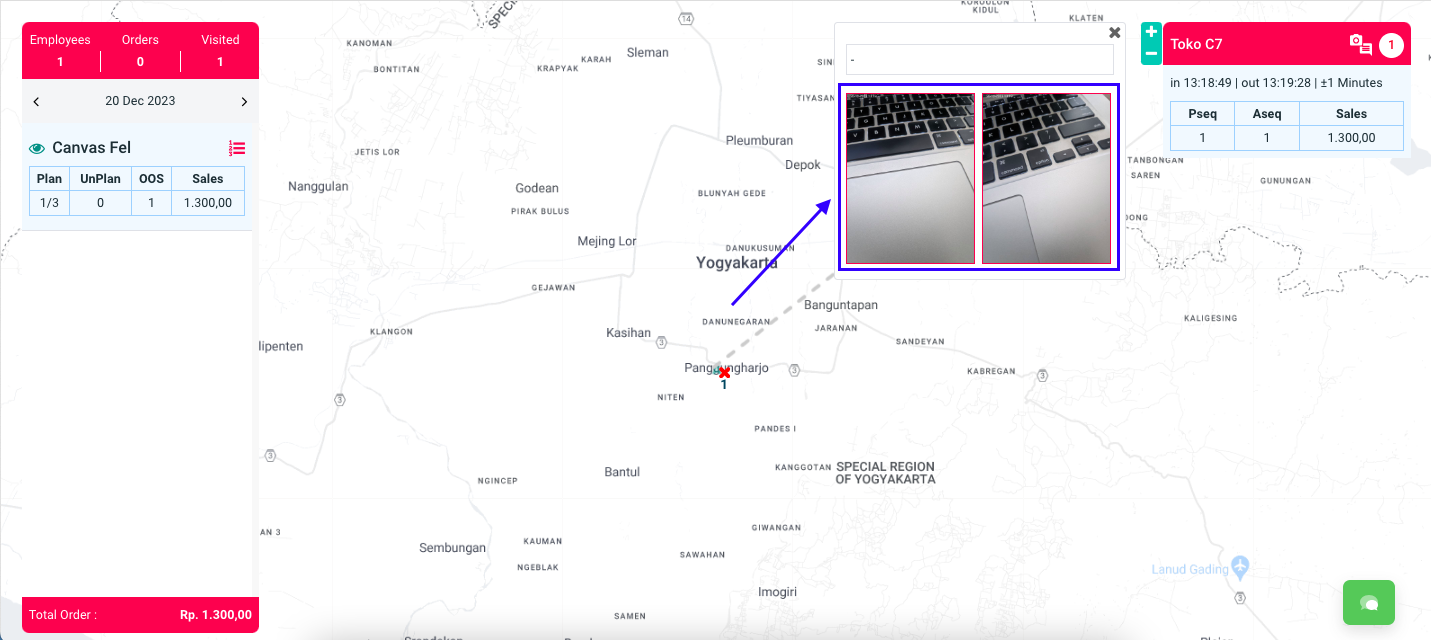
**Step 5:** Akan muncul gambar kunjungan canvassing.

<figure><img src="https://3837174706-files.gitbook.io/~/files/v0/b/gitbook-x-prod.appspot.com/o/spaces%2F-ML6LhsHx5TJpV4GOuvJ%2Fuploads%2FrYwhtHaVwIyjN76mthy4%2FScreenshot%202023-12-20%20at%2013.35.47.png?alt=media&#x26;token=975f0645-28b1-4d39-a59b-61173d790041" alt=""><figcaption></figcaption></figure>

{% hint style="info" %}
Untuk memperbesar gambar silakan bisa klik gambarnya.
{% endhint %}

Selamat mencoba, Kawan Simpli :)&#x20;