# Cara Menghapus Brand

Step 1. Buka Menu **Data Master > Produk> Brand**

<figure><img src="https://3837174706-files.gitbook.io/~/files/v0/b/gitbook-x-prod.appspot.com/o/spaces%2F-ML6LhsHx5TJpV4GOuvJ%2Fuploads%2FcXNIOXhDQzbQnWv5LUGa%2Fimage.png?alt=media&#x26;token=e7428fc3-3b4f-47f5-a897-d3c2a7f3f667" alt="" width="563"><figcaption></figcaption></figure>

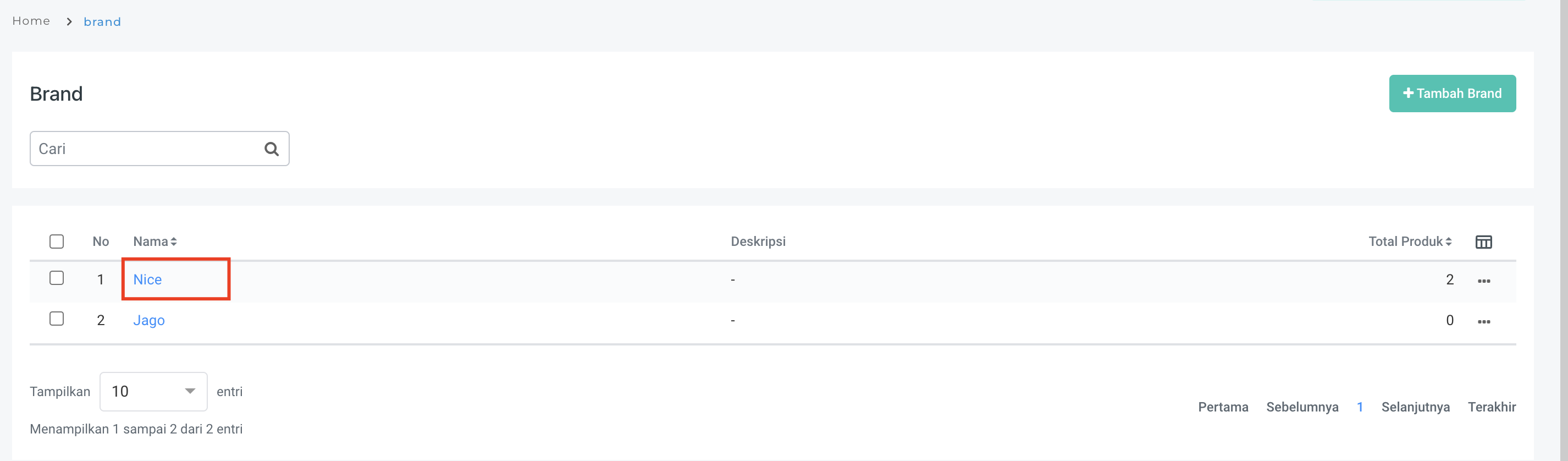
Step 2. Pilih Brand yang akan dihapus.

<figure><img src="https://3837174706-files.gitbook.io/~/files/v0/b/gitbook-x-prod.appspot.com/o/spaces%2F-ML6LhsHx5TJpV4GOuvJ%2Fuploads%2FftGYbecW7OFJF9AmfwPP%2Fimage.png?alt=media&#x26;token=aa4eb505-704a-4a45-9a71-f064d2e2979b" alt="" width="563"><figcaption></figcaption></figure>

Step 3. Pilih Hapus pada action titik tiga di ujung kanan atau Klik nama Brand kemudian pilih Hapus.&#x20;

<figure><img src="https://3837174706-files.gitbook.io/~/files/v0/b/gitbook-x-prod.appspot.com/o/spaces%2F-ML6LhsHx5TJpV4GOuvJ%2Fuploads%2FJixdK1JCdI3EmslKuZ3K%2Fimage.png?alt=media&#x26;token=b6356537-303b-475a-a31e-fbcacebc0d88" alt="" width="563"><figcaption></figcaption></figure>

Step 4. Klik Hapus pada pesan konfirmasi.

<figure><img src="https://3837174706-files.gitbook.io/~/files/v0/b/gitbook-x-prod.appspot.com/o/spaces%2F-ML6LhsHx5TJpV4GOuvJ%2Fuploads%2FI1IiWR02B8rgtl2ulALz%2Fimage.png?alt=media&#x26;token=cffadb5e-7652-469d-9399-b3ecd44642c1" alt="" width="188"><figcaption></figcaption></figure>

Kemudian muncul pesan berikut.

<figure><img src="https://3837174706-files.gitbook.io/~/files/v0/b/gitbook-x-prod.appspot.com/o/spaces%2F-ML6LhsHx5TJpV4GOuvJ%2Fuploads%2Fo5V7Yn6vqbGdOlSqRauv%2Fimage.png?alt=media&#x26;token=bcc1880c-9800-4b3e-8d18-ef4fb114cfb0" alt="" width="188"><figcaption></figcaption></figure>