# Cara Menambahkan Brand

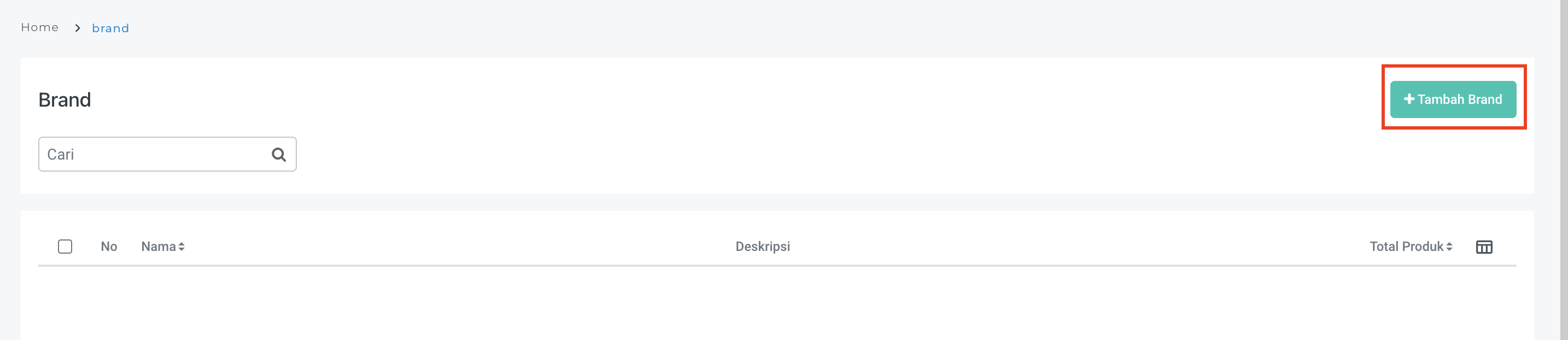
Step 1. Buka Menu **Data Master > Produk> Brand**

<figure><img src="https://3837174706-files.gitbook.io/~/files/v0/b/gitbook-x-prod.appspot.com/o/spaces%2F-ML6LhsHx5TJpV4GOuvJ%2Fuploads%2FcXNIOXhDQzbQnWv5LUGa%2Fimage.png?alt=media&#x26;token=e7428fc3-3b4f-47f5-a897-d3c2a7f3f667" alt="" width="563"><figcaption></figcaption></figure>

Step 2. Pilih **Tambah Brand**

<figure><img src="https://3837174706-files.gitbook.io/~/files/v0/b/gitbook-x-prod.appspot.com/o/spaces%2F-ML6LhsHx5TJpV4GOuvJ%2Fuploads%2Fn4Qzu4ij0Lm6TtrDXyfU%2Fimage.png?alt=media&#x26;token=1d9bc52c-84af-4180-8a2d-f3a57feb01e3" alt="" width="563"><figcaption></figcaption></figure>

Step 3. Isi data pada **Detail Brand** dan **Tambah Produk**

<figure><img src="https://3837174706-files.gitbook.io/~/files/v0/b/gitbook-x-prod.appspot.com/o/spaces%2F-ML6LhsHx5TJpV4GOuvJ%2Fuploads%2FONMpTqx5oNduAGfqVVyO%2Fimage.png?alt=media&#x26;token=6d803090-97cc-491d-b906-7319765a2fb0" alt="" width="563"><figcaption></figcaption></figure>

**Study Case:** Anda akan mendaftarkan data brand produk dengan keterangan berikut.\
**Brand: Nice**\
**Produk : Susu Kedelai dan Susu Strawberry**

<figure><img src="https://3837174706-files.gitbook.io/~/files/v0/b/gitbook-x-prod.appspot.com/o/spaces%2F-ML6LhsHx5TJpV4GOuvJ%2Fuploads%2FUvPqGi3W3jE8IqjQH8wW%2Fimage.png?alt=media&#x26;token=877e1564-4432-4d04-baf8-eb0281d129f2" alt="" width="563"><figcaption></figcaption></figure>

Step 4. Centang produk yang diinginkan, kemudian klik **Pilih**.

<figure><img src="https://3837174706-files.gitbook.io/~/files/v0/b/gitbook-x-prod.appspot.com/o/spaces%2F-ML6LhsHx5TJpV4GOuvJ%2Fuploads%2Fgr0pTtd3aY6cr8MGc5dq%2Fimage.png?alt=media&#x26;token=c8456c10-bded-4c35-9b10-80bf5d27b133" alt="" width="563"><figcaption></figcaption></figure>

Step 5. klik **Simpan**.&#x20;

<figure><img src="https://3837174706-files.gitbook.io/~/files/v0/b/gitbook-x-prod.appspot.com/o/spaces%2F-ML6LhsHx5TJpV4GOuvJ%2Fuploads%2FGlVTSvY5F4QD4Kigv9Da%2Fimage.png?alt=media&#x26;token=11aeaecd-273f-43c1-a4b0-98349e9c5e32" alt="" width="563"><figcaption></figcaption></figure>

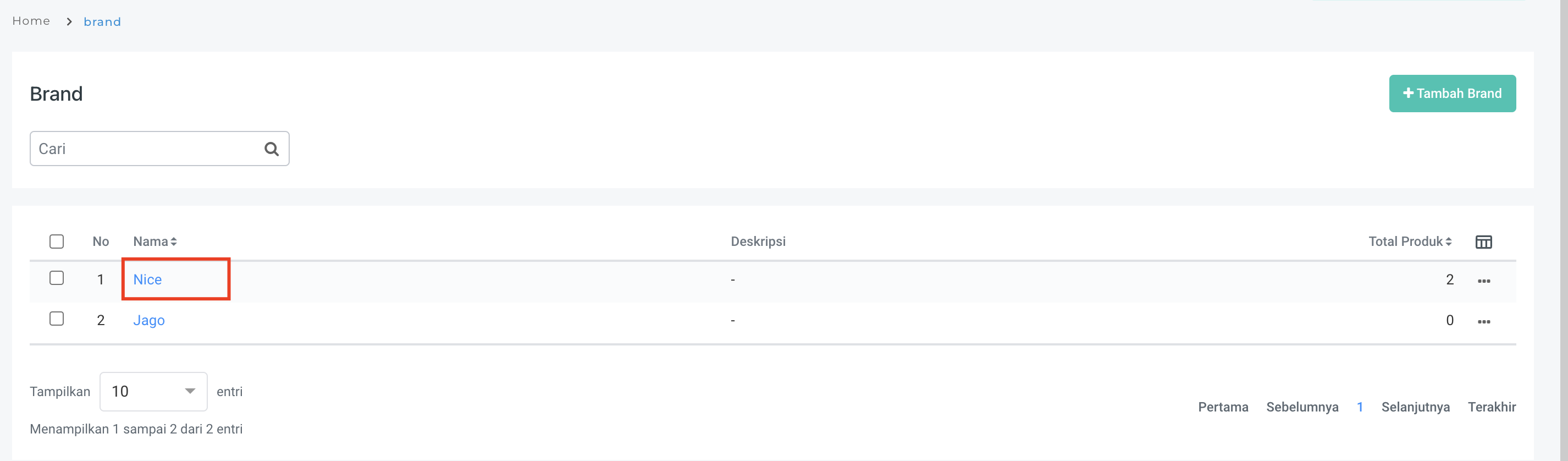
Brand telah tersimpan dan user akan diarahkan menu daftar Brand seperti berikut.

<figure><img src="https://3837174706-files.gitbook.io/~/files/v0/b/gitbook-x-prod.appspot.com/o/spaces%2F-ML6LhsHx5TJpV4GOuvJ%2Fuploads%2FftGYbecW7OFJF9AmfwPP%2Fimage.png?alt=media&#x26;token=aa4eb505-704a-4a45-9a71-f064d2e2979b" alt="" width="563"><figcaption></figcaption></figure>