> For the complete documentation index, see [llms.txt](https://panduan-sap.simplidots.id/llms.txt). Markdown versions of documentation pages are available by appending `.md` to page URLs; this page is available as [Markdown](https://panduan-sap.simplidots.id/sales-automation-platform/smh-sales-management-hub/data-master/pegawai/cara-mengubah-posisi-tanpa-hirarki.md).
# Cara Mengubah Posisi (Tanpa Hirarki)
Anda dapat mengubah data Posisi yang sudah terdaftar pada Akun SimpliDOTS.
### Cara Mengubah Posisi (Tanpa Hirarki)
Jika Posisi yang ingin Anda ubah tidak menggunakan Fitur Hirarki, maka silakan ikuti langkah berikut:
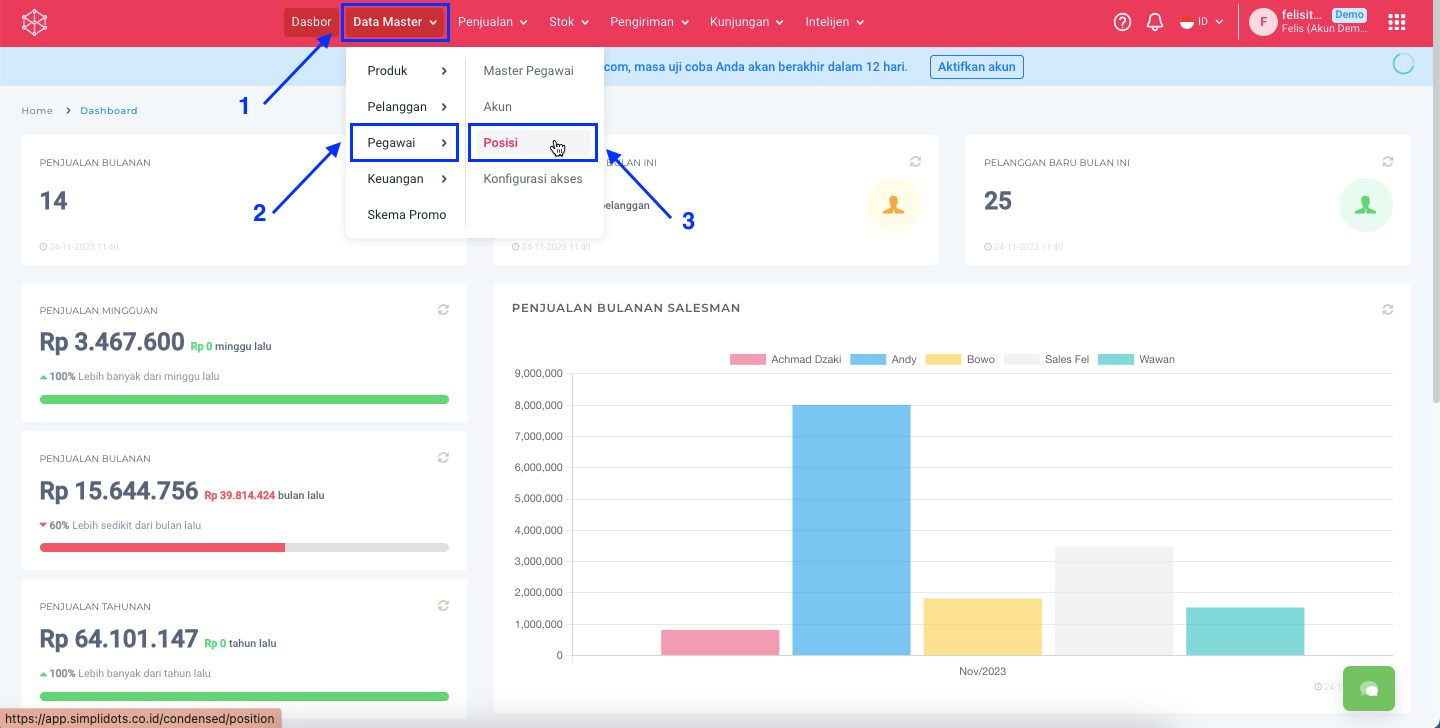
**Step 1:** Masuk ke menu **Data Master > Pegawai > Posisi.**
**Step 2:** Untuk mengubah Posisi bisa dengan 2 cara, yaitu melalui **icon**  pada kolom **Action** dan melalui **detail Posisi**.
{% tabs %}
{% tab title="Icon Action" %}
**Step 2.1:** Klik pada icon  di kolom **Action** pada Posisi yang akan diubah.
**Step 2.2:** Klik tombol **Ubah**.
{% endtab %}
{% tab title="Detail Posisi" %}
**Step 2.1:** Klik **Nama** pada Posisi yang akan diubah.
**Step 2.2:** Klik tombol **Ubah**.
{% endtab %}
{% endtabs %}
**Step 3:** Ubah **Nama Posisi** dengan nama yang baru.
**Contoh:** Senior Project Manager.
**Step 4:** Klik tombol **Simpan**.
**Step 5:** Apabila berhasil tersimpan akan kembali ke halaman Posisi dan Nama Posisi sudah berubah menjadi Nama yang baru.
Selamat mencoba, Kawan Simpli :)