> For the complete documentation index, see [llms.txt](https://panduan-sap.simplidots.id/llms.txt). Markdown versions of documentation pages are available by appending `.md` to page URLs; this page is available as [Markdown](https://panduan-sap.simplidots.id/sales-automation-platform/smh-sales-management-hub/data-master/keuangan/cara-mengubah-jangka-waktu-pembayaran.md).

# Cara Mengubah Jangka Waktu Pembayaran

Untuk mengubah jangka waktu pembayaran yang sebelumnya sudah disimpan dengan data yang baru.

### Cara Mengubah Jangka Waktu Pembayaran

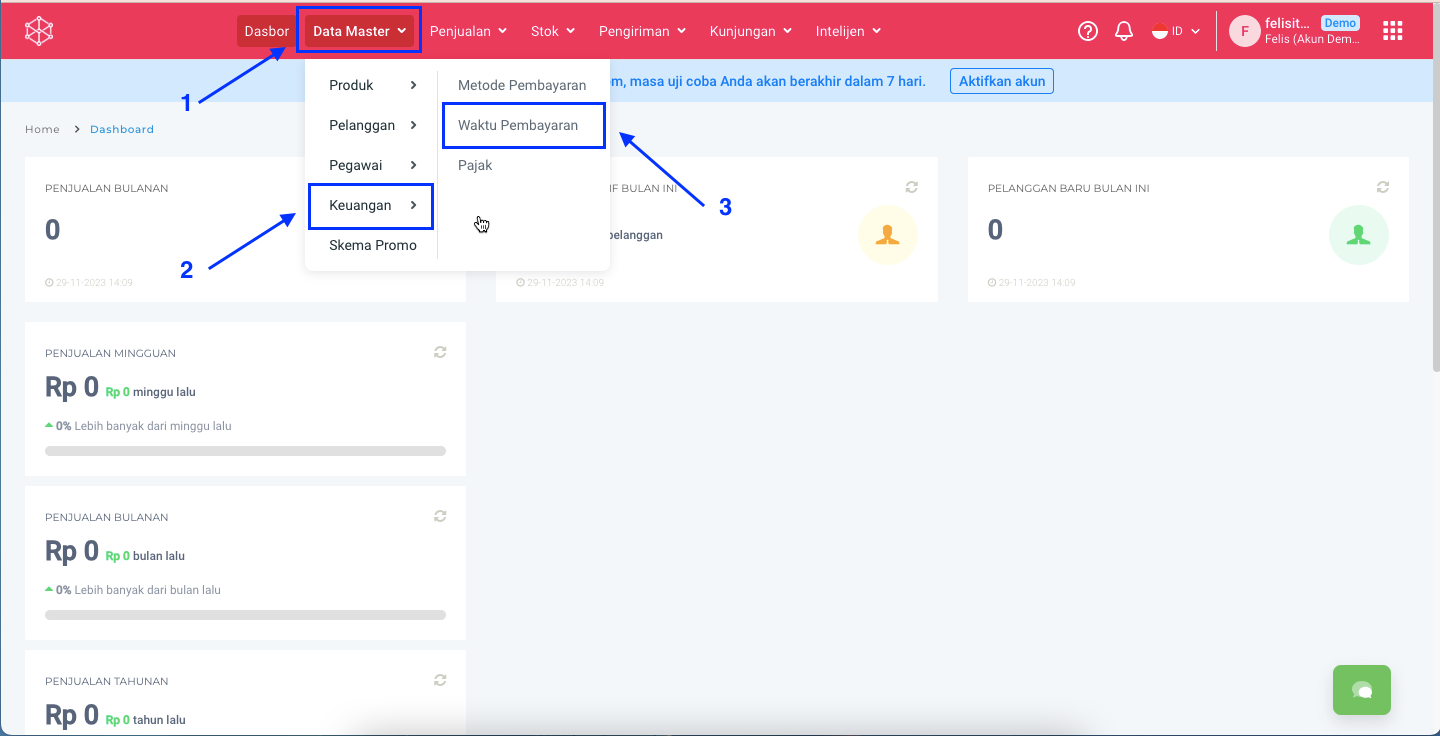
**Step 1:** Masuk ke menu **Data Master > Keuangan** > **Waktu Pembayaran.**

<figure><img src="https://3837174706-files.gitbook.io/~/files/v0/b/gitbook-x-prod.appspot.com/o/spaces%2F-ML6LhsHx5TJpV4GOuvJ%2Fuploads%2FNPeUUWE7Ex0QRtK8eI2g%2Fimage.png?alt=media&amp;token=036d30f5-d66e-4d5f-97ea-2d579657b6c8" alt=""><figcaption></figcaption></figure>

**Step 2:** Untuk mengubah Waktu Pembayaran bisa dengan 2 cara, yaitu melalui **icon** <img src="https://3837174706-files.gitbook.io/~/files/v0/b/gitbook-x-prod.appspot.com/o/spaces%2F-ML6LhsHx5TJpV4GOuvJ%2Fuploads%2FHozE4W0eq224g1I2jlms%2FScreenshot%202023-11-24%20at%2014.15.08.png?alt=media&amp;token=fabcd796-24ce-4ee8-a72b-4cbd27a55469" alt="" data-size="line"> pada kolom **Action** dan melalui **detail Waktu Pembayaran**.

{% tabs %}
{% tab title="Icon Action" %}
**Step 2.1:** Klik pada icon  <img src="https://3837174706-files.gitbook.io/~/files/v0/b/gitbook-x-prod.appspot.com/o/spaces%2F-ML6LhsHx5TJpV4GOuvJ%2Fuploads%2FHozE4W0eq224g1I2jlms%2FScreenshot%202023-11-24%20at%2014.15.08.png?alt=media&amp;token=fabcd796-24ce-4ee8-a72b-4cbd27a55469" alt="" data-size="line"> di kolom **Action** pada Waktu Pembayaran yang akan diubah.
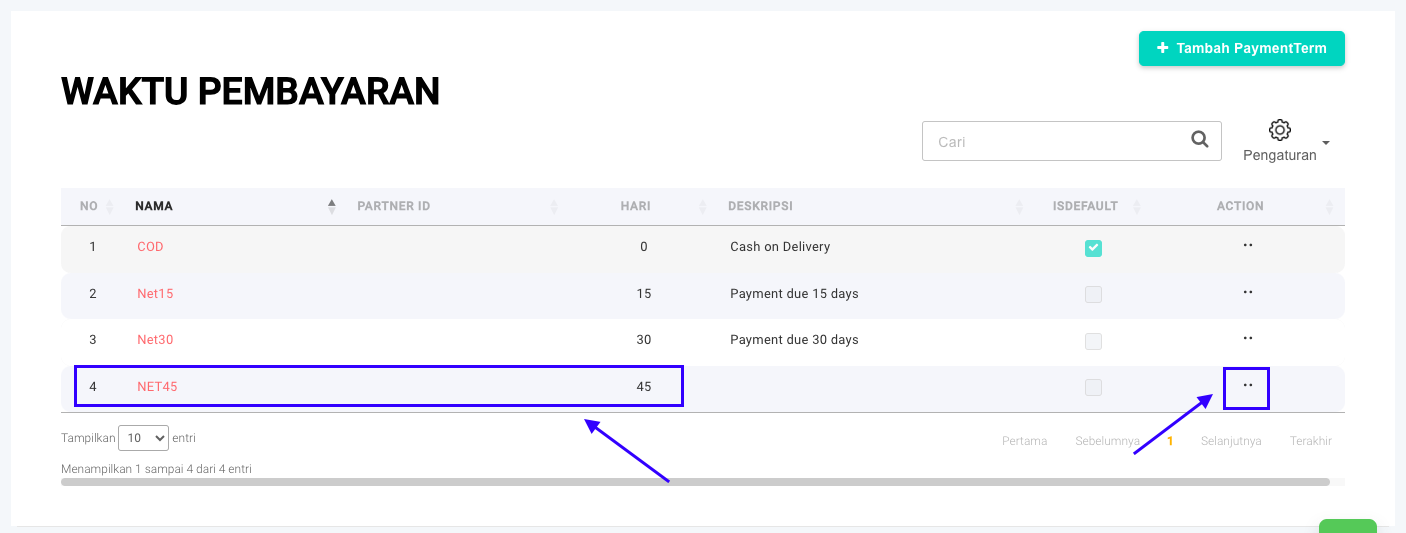
<figure><img src="https://3837174706-files.gitbook.io/~/files/v0/b/gitbook-x-prod.appspot.com/o/spaces%2F-ML6LhsHx5TJpV4GOuvJ%2Fuploads%2FMn7yw81rbVaFlIYU1HY0%2FScreenshot%202023-11-30%20at%2015.38.47.png?alt=media&amp;token=a834ad52-5063-42bc-857c-0ac3bbe0caa6" alt=""><figcaption></figcaption></figure>

**Step 2.2:** Klik tombol **Ubah.**

<figure><img src="https://3837174706-files.gitbook.io/~/files/v0/b/gitbook-x-prod.appspot.com/o/spaces%2F-ML6LhsHx5TJpV4GOuvJ%2Fuploads%2FNKgX9veuNYy1z3L4J3Rh%2FScreenshot%202023-11-30%20at%2015.56.34.png?alt=media&amp;token=387ebd5e-5295-4740-ba8b-834ddcc2ec4d" alt=""><figcaption></figcaption></figure>
{% endtab %}

{% tab title="Detail Waktu Pembayaran" %}
**Step 2.1:** Klik **Nama** pada Waktu Pembayaran yang akan diubah.

<figure><img src="https://3837174706-files.gitbook.io/~/files/v0/b/gitbook-x-prod.appspot.com/o/spaces%2F-ML6LhsHx5TJpV4GOuvJ%2Fuploads%2Fc0LUsehpnXGeZVqCxuJX%2FScreenshot%202023-11-30%20at%2015.39.29.png?alt=media&amp;token=1c67f679-4f59-4d67-8e99-b4cd689d838f" alt=""><figcaption></figcaption></figure>

**Step 2.2:** Klik tombol **Ubah.**

<figure><img src="https://3837174706-files.gitbook.io/~/files/v0/b/gitbook-x-prod.appspot.com/o/spaces%2F-ML6LhsHx5TJpV4GOuvJ%2Fuploads%2FInzK9n0St6Gt3ncvIO9P%2FScreenshot%202023-11-30%20at%2015.39.54.png?alt=media&amp;token=f7d164ac-0670-4653-a08c-f9ce85987a47" alt=""><figcaption></figcaption></figure>
{% endtab %}
{% endtabs %}

**Step 3:** Ubah data Waktu Pembayaran dengan data yang baru.&#x20;

<figure><img src="https://3837174706-files.gitbook.io/~/files/v0/b/gitbook-x-prod.appspot.com/o/spaces%2F-ML6LhsHx5TJpV4GOuvJ%2Fuploads%2FzqpFfuu9jkRMzIpMf1Re%2FScreenshot%202023-11-30%20at%2015.40.31.png?alt=media&amp;token=650f4f2b-a596-4bdc-8337-63e895b88cdc" alt=""><figcaption></figcaption></figure>

**Step 4:** Setelah selesai mengubah data silakan klik tombol **Simpan**.

**Step 5:** Waktu Pembayaran berhasil terupdate jika muncul popup notifikasi **Data updated successfully.**&#x20;

<figure><img src="https://3837174706-files.gitbook.io/~/files/v0/b/gitbook-x-prod.appspot.com/o/spaces%2F-ML6LhsHx5TJpV4GOuvJ%2Fuploads%2FV90LSFSz9ZQ52fDbzoVX%2FScreenshot%202023-11-28%20at%2014.16.37.png?alt=media&amp;token=993b1e6b-2c16-4f26-8ddf-0895f3fb0f02" alt=""><figcaption></figcaption></figure>

**Step 6:** Waktu Pembayaran yang baru saja diubah akan muncul pada halaman **Waktu Pembayaran** dengan data yang baru.

<figure><img src="https://3837174706-files.gitbook.io/~/files/v0/b/gitbook-x-prod.appspot.com/o/spaces%2F-ML6LhsHx5TJpV4GOuvJ%2Fuploads%2FBVtMW6JnWKb6N9gkNnAr%2FScreenshot%202023-11-30%20at%2015.41.04.png?alt=media&amp;token=8c3b28d7-308c-40f4-b6c5-f9c266d1161d" alt=""><figcaption></figcaption></figure>

Selamat mencoba, Kawan Simpli :)&#x20;