> For the complete documentation index, see [llms.txt](https://panduan-sap.simplidots.id/llms.txt). Markdown versions of documentation pages are available by appending `.md` to page URLs; this page is available as [Markdown](https://panduan-sap.simplidots.id/sales-automation-platform/smh-sales-management-hub/data-master/form-engine-form-survey/cara-edit-form-survey.md). Agents can also search and read this documentation through its [MCP server](https://panduan-sap.simplidots.id/~gitbook/mcp).

# Cara Edit Form Survey

**Step 1:** Masuk ke **Data Master > Form Engine**.

<figure><img src="https://3837174706-files.gitbook.io/~/files/v0/b/gitbook-x-prod.appspot.com/o/spaces%2F-ML6LhsHx5TJpV4GOuvJ%2Fuploads%2FMDNFvf1oYWgg3EPqmqAC%2FScreenshot%202026-09-28%20064840.png?alt=media&amp;token=58163fca-1a8d-41c8-ae13-cb35b5bfd05a" alt=""><figcaption></figcaption></figure>

**Step 2:** Klik action <img src="https://3837174706-files.gitbook.io/~/files/v0/b/gitbook-x-prod.appspot.com/o/spaces%2F-ML6LhsHx5TJpV4GOuvJ%2Fuploads%2Fx2lj2DvgHItqTHoRLmgg%2Fimage.png?alt=media&amp;token=2fd503f6-3917-4d42-bf68-c9614b29051c" alt="" data-size="line">lalu pilih **Ubah.**

<figure><img src="https://3837174706-files.gitbook.io/~/files/v0/b/gitbook-x-prod.appspot.com/o/spaces%2F-ML6LhsHx5TJpV4GOuvJ%2Fuploads%2Far63fl5tlwbfIulJ6Wcr%2FScreenshot%202026-09-29%20075321.png?alt=media&amp;token=cdff8b26-6e35-4b73-9a25-8a72bba29a94" alt=""><figcaption></figcaption></figure>

**Step 3**: Anda akan masuk ke halaman **Edit Formulir.**

<figure><img src="https://3837174706-files.gitbook.io/~/files/v0/b/gitbook-x-prod.appspot.com/o/spaces%2F-ML6LhsHx5TJpV4GOuvJ%2Fuploads%2FH6qQMrkEbK6zU9ssIvbo%2Fimage.png?alt=media&amp;token=c095a0d1-ebf0-47f2-9715-1b2f4e489e52" alt=""><figcaption></figcaption></figure>

{% hint style="info" %}
Anda dapat memperbarui **Nama Formulir, Tipe Formulir, Periode Selesai, Pelanggan, Deskripsi**, maupun **pertanyaan** sesuai kebutuhan.
{% endhint %}

**Step 4:** Klik **Simpan**.

<figure><img src="https://3837174706-files.gitbook.io/~/files/v0/b/gitbook-x-prod.appspot.com/o/spaces%2F-ML6LhsHx5TJpV4GOuvJ%2Fuploads%2FF05PdwtaDVfyT28VXh9s%2Fimage.png?alt=media&amp;token=913b5e41-d51c-4c8e-8295-48f7aa099e94" alt=""><figcaption></figcaption></figure>

{% hint style="info" %}

* **Simpan:** formulir akan tersimpan sebagai **Draft** dan belum terbit di aplikasi **SFA**.
* **Simpan & Terbitkan:** formulir akan tersimpan dan langsung **Publish** di aplikasi **SFA**.
  {% endhint %}

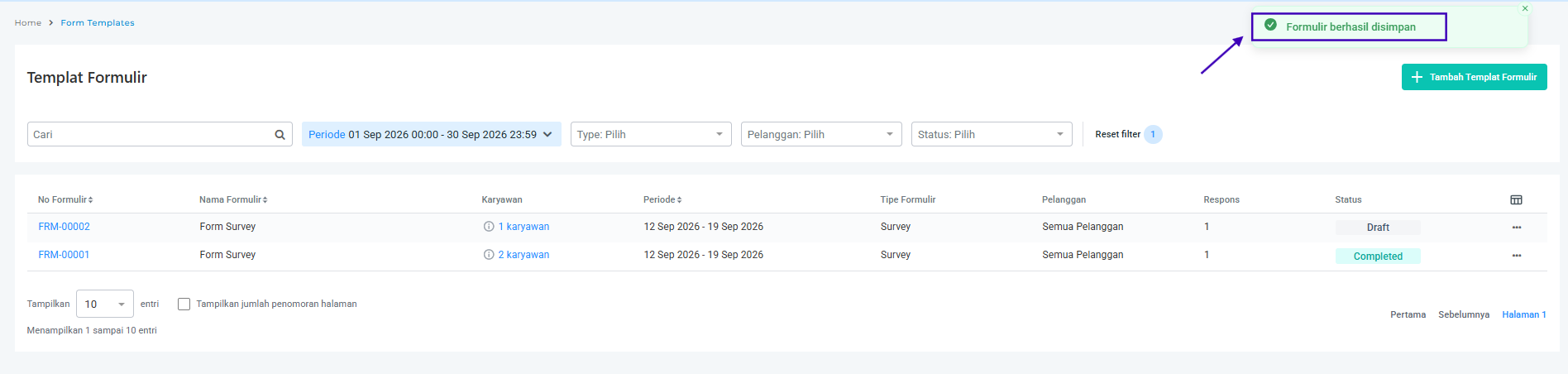
**Step 5:** Muncul pop-up **Formulir berhasil disimpan.**

<figure><img src="https://3837174706-files.gitbook.io/~/files/v0/b/gitbook-x-prod.appspot.com/o/spaces%2F-ML6LhsHx5TJpV4GOuvJ%2Fuploads%2F1TyiCnwVo9A7kzd2tuue%2Fimage.png?alt=media&amp;token=b19acc36-96ac-45bf-bb76-2bf9117a4774" alt=""><figcaption></figcaption></figure>

Silakan dicoba, Kawan Simpli! :)